Monday, February 18, 2013

Why Parallax? What can you achieve with Parallax Effects?

This week I would like bring up the subject of ‘Parallax Web Design’. Parallax scrolling is a design technique that has become increasingly popular lately – and not without reason. The web user wants more from a website – entertained and involved. We are more than willing to engage with a website, if we are invited to do so anyway. With parallax scrolling you can do a bunch of great things to invite your visitors to engage with your site. There are plenty of websites out there with beautiful, or great, or even awesome examples of parallax scrolling in web design. Although these sites give us plenty of inspiration what they don’t tell us is why we should use it.

I have put together a list of some really awesome sites that I am going to list in a moment, but I want to kind of give you some reasons behind the whole idea.

A List

Firstly, it is more practical advantage. It’s a more vibrate way to display your products.

Bagigia


Then you have websites where the user is drawn in and capture them with an engaging story. This is one of my favorites. This is by Peugeot for their new Hybrid4 technology.

HYbrid 4 Peugeot


And this one is kind of interesting if you drink beer that is. The drink Michelberger Booze engages the user in a very creative way. Just scroll down gently.

Michelberger Booze


This next one is kind of a fun interactive website to engage the user. This site is called the KRYSTALRAE fall collection. Different outfits are presented on the same model. Very interesting to say the least.


KRYSTALRAE


Next up is a website with a very unique look and feel. Here is a great detail: Once you hit the bottom of the page, you automatically start at the top again — a seamless, never ending scrolling engagement.

Unfold


Next to last, you have got your food websites. Smokey Bones is very interesting especially with the bar maid at the beer her hair is swaying.

Smokey Bones


I have got one more for you which is one of the best car websites that I have ever seen by Land Rover. I especially like the magnifying glass effect they give you of the body of the vehicle.

Land Rover


Here is another car website – Mercedes that takes you on a test drive.

Mercedes


In conclusion, Parallax scrolling can be used to achieve many things in web design. You can present your product in new and engaging ways, or tell more vivid and interactive stories. Put your visitors in charge and make it their own choice to engage with your site.

Wednesday, February 6, 2013

3D Globe Photoshop CS6 Tutorial

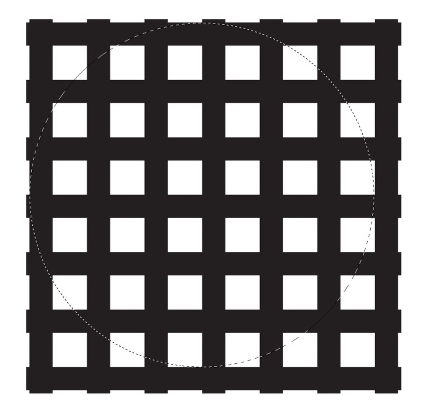
Yes, I took a course in Photoshop (Yes, I earned an 'A') but college level courses only teach you the basic's. All I have obtained as far as skills since my course I have taught myself by following tutorial's only to build on my basic skills I learnt in class I took about 3 years ago. So with that said I want to be able to be one of those Web/Graphic Designers to give back to newbies just coming into the industry. So this week I wanted to do a tutorial on an 3-D Globe Image. I think it is pretty cool and relatively easy to do. Let's go ahead and get into it. Open up Photoshop and CTL-N to create an new document. I used width as 2560 pixels by height as 1440 pixels. You can make it whatever you want. With the Rectangle Tool create a rectangle, then just start duplicating it until you get about 7 columns. Use the Distribute Horizontal to make the distances all the same between them. After that select the first layer of rectangles and holding shift click the last layer of rectangles and CTL-E to merge them all together. Now duplicate that layer and CTL-T to transform them and rotate them to create a grid like this:
Next step, we are going to us the Elliptical Marquee Tool (M) to create a circle selection like the one in the image below.
Ok, moving right along. Click Filter>Distort>Sphere. Use 100% for the Amount and Normal for the Mode. You should have something like this:
Cut the selection and paste it in order to get the front of your globe.
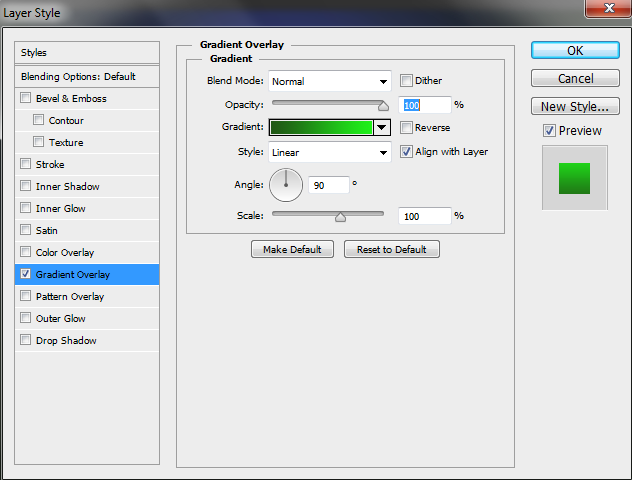
Click Layer>Layer Styles>Gradient Overlay. Apply a gradient from dark green (#205715, is what I used you can use whatever color fits your fancy) to light green(#1ef11a, my choice) in a linear mode (if you can't tell I like the color 'Green'). Just copy down all the different options if I don't put them in this tutorial.
Now you should have something like this image:
Then go ahead a duplicate that layer (CTL-J) and rotate it about 45 degrees. You are going to have to change the gradient colors to light green on top and then the dark green on the bottom. So far you have what appears to be a nice 3D effect.
Then putting them together you should start having a nice 3D Globe Effect.
Now, we have to give the background some color so let's use a nice blue color. Select the background layer and click on Layer>Layer Styles>Gradient Overlay. I used the colors (#0c1807) and (#3c52f4). Radial for the style and 140% for the Scale. Angle at 90 degrees. Position the center of the gradient a little bit on the top of the center of your globe. To do that just click and hold to move the gradient position while you are in the Gradient Overlay property.
It come out nicely and should have something like this if you are following my color scheme.
Select the front of your 3D Globe and edit the layer styles. Double click then click on Inner Shadow and I am going to use (#2afe00), change the Blend Mode to Color Dodge for the Blend Mode of 60% Opacity. Angle -104 degrees uncheck Use Global Light. Distance at 3px amd Sizeat 7px. After your editing abilities of the Layer Style you should have something like this.
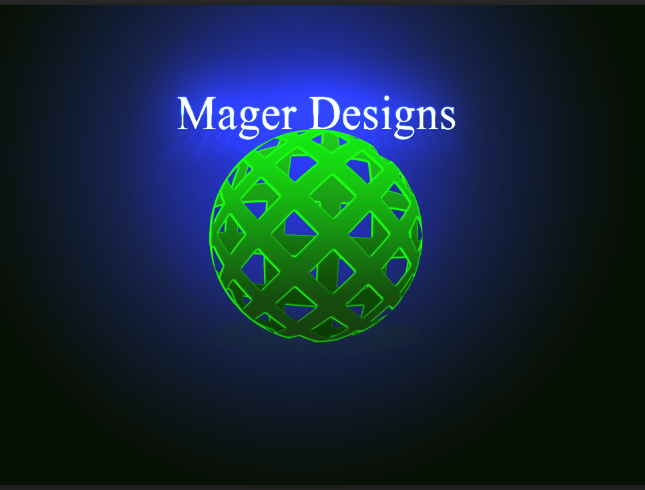
Now, you should be very proud of yourself you finished your 3D Globe Photoshop Graphic. Here is the finished product.

Tuesday, January 29, 2013

CSS Drop Down Menu Tutorial

Diana Magers | Week 4 Blog | Blogger.com


CSS Drop Down Menu Tutorial


This week I wanted to intergrate a tutorial in my blog. My tutorial will be on HTML5 and CSS Drop Down Menu. I will be throwing CSS3 properties and you can create a design.. Follow this tutorial to see the step by step process of building your own dropdown menu.

First, after starting your HTML document ( I usually start mine in Dreamweaver CS4 ).


<nav>
	<ul>
		<li><a href="#">Home</a></li>
		<li><a href="#">Tutorials</a></li>
		<li><a href="#">Blog</a></li>
		<li><a href="#">About</a></li>
		<li><a href="#">Contact</a></li>
	</ul>
</nav>


I am going to use HTML5 for the navigation menu in a <nav> tag, then add the primary navigation links in a simple unordered list.


<nav>
<ul>
<li><a href="#">Home</a></li>
<li><a href="#">Tutorials</a>
<ul>
<li><a href="#">Photoshop</a></li>
<li><a href="#">Illustrator</a></li>
<li><a href="#">Web Design</a>
<ul>
<li><a href="#">HTML</a></li>
<li><a href="#">CSS</a></li>
<li><a href="#">jQuery</a></li>
<li><a href="#">Javascript</a></li>
</ul>
</li>
</ul>
</li>
<li><a href="#">Blog</a>
<ul>
<li><a href="#">Week One</a></li>
<li><a href="#">Week Two</a></li>
<li><a href="#">Week Three</a></li>
</ul>
</li>
<li><a href="#">About</a></li>
<li><a href="#">Contact</a></li>
</ul>
</nav>


The first sets of sub-menus can then be added under the “Tutorials” and "Blog” links, each one being a complete unordered list inserted within the <li> of its parent menu option.


<nav>
<ul>
<li><a href="#">Home</a></li>
<li><a href="#">Tutorials</a>
<ul>
<li><a href="#">Photoshop</a></li>
<li><a href="#">Illustrator</a></li>
<li><a href="#">Web Design</a>
<ul>
<li><a href="#">HTML</a></li>
<li><a href="#">CSS</a></li>
<li><a href="#">jQuery</a></li>
<li><a href="#">Javascript</a></li>
</ul>
</li>
</ul>
</li>
<li><a href="#">Blog</a>
<ul>
<li><a href="#">Week One</a></li>
<li><a href="#">Week Two</a></li>
<li><a href="#">Week Three</a></li>
</ul>
</li>
<li><a href="#">About</a></li>
<li><a href="#">Contact</a></li>
</ul>
</nav>


The secondary sub-menu is nested under the “Web Design” option of the first sub-menu. These links are placed into another unordered list and inserted into the “Web Design” <li>.

So far this leaves us with a nice layout of links with the sub-menus having a clear relation to their parents.


/>

The CSS Styling


  nav ul ul {
display: none;
} nav ul li:hover > ul {
display: block;
}

Next, we are going to have to style our newly developed drop down menu. Let’s get started with the CSS stylesheet by getting the basic dropdown functionality working. With CSS style we can target individual elements buried deep in the HTML structure without the need for extra IDs or classes. First hide the sub menus by targeting any <ul>’s within a <ul> with the display:block; declaration. In order to make these menus reappear they need to be converted back to block elements on hover of the <li>. The > child selector makes sure only the child <ul> of the ,li> being hovered is targeted, rather than all sub menus appearing at once.


nav ul {
background:#F6A4D5;
background: linear-gradient(top, #F6A4D5 0%,#A46582 100%);
background: -moz-linear-gradient(top, #F6A4D5 0%, #A46582 100%);
background: -webkit-linear-gradient(top, #F6A4D5 0%,#A46582 100%);
box-shadow: 0px 0px 9px rgba(0,0,0,0.15);
padding: 0 20px;
border-radius: 3px;
list-style: none;
position: relative;
display: inline-table;
}
nav ul:after {
content: ""; clear: both; display: block;
}

We can then start to style up the main navigation menu with the help of CSS3 properties as using gradients, border radius and a box shadow. Adding position:relative; will allow us to absolutely position the sub menus according to this main navigation, then display:inline-table will condense the width of the menu to fit. The clearfix style rule will clear the floats used on the subsequent list items without the use of overflow:hidden, which would hide the sub menus and prevent them from appearing.


nav ul li {
	float: left;
}
	nav ul li:hover {
		background: #4b545f;
		background: linear-gradient(top, #4f5964 0%, #5f6975 40%);
		background: -moz-linear-gradient(top, #4f5964 0%, #5f6975 40%);
		background: -webkit-linear-gradient(top, #4f5964 0%,#5f6975 40%);
	}
		nav ul li:hover a {
			color: #fff;
		}
	
	nav ul li a {
		display: block; padding: 25px 40px;
		color: #757575; text-decoration: none;
	}

The individual menu items are then styled up with CSS rules added to the <li> and the nested anchor. In the browser this will make the link change to a blue gradient background and white text.


nav ul li {
float: left;
}
nav ul li:hover {
background: #F6A4D5;
background: linear-gradient(top, #D02090 0%, #FF34B3 50%);
background: -moz-linear-gradient(top, #4f5964 0%, #5f6975 50%);
background: -webkit-linear-gradient(top, #4f5964 0%,#5f6975 50%);
}
nav ul li:hover a {
color: #ffffff;
}

nav ul li a {
display: block;
padding: 25px 40px;
color: #ffffff;
text-decoration: none;
}
nav ul ul {
background: #5f6975;
border-radius: 0px;
padding: 0;
position: absolute;
top: 100%;
}

The main navigation bar now has all of it's styles, but the sub menus still need some work.

They are currently inheriting styles from their parent elements, so a change of background and the removal of the border-radius and padding fixes their appearance. To make sure they fly out underneath the main menu they are positioned absolutely 100% from the top of the <ul>.


The <li>’s of each <ul> in the sub menu don’t need floating side by side, instead they’re listed vertically with thin borders separating each one. A quick hover effect then darkens the background to act as a visual cue.


	nav ul ul li {
float: none;
border-top: 1px solid #6b727c;
border-bottom: 1px solid #575f6a;
position: relative;
}
nav ul ul li a {
padding: 15px 40px;
color: #fff;
}
nav ul ul li a:hover {
background: #4b545f;
}
nav ul ul ul {
position: absolute; left: 100%; top:0;
}

The final step is to position the sub-sub-menus accordingly. These menus will be inheriting all the sub-menu styling, so all they need is to be positioned absolutely to the right (left:100%(percent)) of the relative position of the parent <li>.

The Completed Pure CSS Dropdown Menu

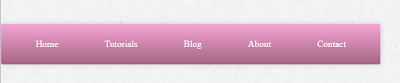
Here you can view the finished product in the browser:

Menu

Wednesday, January 23, 2013

Responsive Design

Responsive Design
With the demand for convenience access to content, social media, and services available anywhere, anytime, and from any device growing at an alarming rate, responsive design platform is front and center. Cutting edge architecture optimizes websites for desktops and provides 'app-like' experiences for smartphones, tablets and e-readers.
In simple terms, a responsive web design uses 'media queries' to figure out what resolution of device the user is using. Flexible images and fluid grids then size correctly to fit the screen. For example, if you are viewing an website on a desktop browser, trying to make your browser window smaller the images and content column will skrink and the side bar would disappear all together. On the other hand, if you are using a touch device, you are able to swipe between columns.
Furthermore, the benefits are obvious to the most casual observer, building a website once, and it works across thousands of different screens, seems to be the way of the web designing industry.

Why is it for us?

From a business aspect, this type of system is very advantageous because not you aren't having to deal with individual pages. You have one single site that feeds all of your devices instead of having to make an individual site for the phone, tablet, and laptop. End result saving tons of time and money.

Marketing?

It is my opioion this idea is much better for marketing because by cutting back on multiple sites all you are actually creating now is a more defined path to yourself. One single site versus multiple sites will get a higher ranking and more traffic because you are combining numbers from multiple sites.
Also since you are using only one site now for traffic your analytical numbers should be much more accurate in tracking the number of true users. You can even adjust ad platforms for the devices.

Bottom Line

If you are targeting multiple devices that customers use to access your site then this is an idea that needs some serious consideration. Keeping in contact with customers should be a pretty big deal if you get a lot of business from the web. However if most of your business comes from only one aspect then the cost isn’t worth it as your customers won’t benefit.

Personal Note:
I currently am enrolled in Wake Tech Community College, Raleigh, North Carolina and if you have been following my blogs you know that I am in the Web Technology Program. I am take an e-Portfolio course and this blog is part of my course work. I wanted to make mention that I will be building a 'Responsive Design' for my portfolio. I am researched alot of different platform's and I am really liking the whole idea of being veratile in my designs.

Copyright © 2013 | Diana Magers | Spring Semester 2013

Sunday, January 20, 2013

Psychological of Color


Psychological of Color

Our reaction to color is instantaneous and has a profound impact on the choices we make.

We all have our different practices that we use for starting a design of any kind. Sometimes we start with paper and pen or sometimes we may even jump right into Photoshop or Illustrator and begin tossing around ideas. One step we can’t skip though is choosing the right color scheme for our design. It is something that we don’t really thing about but has a subliminal effect on how we react to what we do every day. 

We have all heard of the phrase, ‘First Impression’s are the most important’.  Well, it is true, I have discovered that most important first-impression, and psychological factor impacting website viewers is COLOR.  It is always important to ensure that we understand the color we use in our design. Whether our design be a web site design or print work the color combination we choose is one of the most important choices. In order to ensure that we have a combination that will work well there is always some research that may be done.

The internet is a very visual and extremely psychological medium.  Before a user reads a single word of a marketing advertisement, the user is confronted with the background color of the website, the header, the text color. Different cultures react to colors differently, and this brief overview focuses on the responses of people in the Western Hemisphere.

Red is the most emotional color that will deliver any one of the following feelings to your visitors/readers depending on the mannerism you use it and intents you have to use it: Energy, strength, passion, eroticism, fire, lust, desire, blood, risk, war, danger, attention and romance. When you think of this color you should be thinking about hearts, stop signs and fire trucks.

Pink is an easy one and is more of a soft color that will deliver the following feelings: Romance, love, friendship, femininity, truth, passivity, good will, emotional healing, peace, calming, affection, emotional maturity, caring, nurturing, sweet tasting, sweet smelling, ethereal, delicacy. It can also give the emotion of devoting to breast cancer. For obvious reasons you can see why the National Breast Cancer Foundation chose this color for the breast cancer awareness month. You should be thinking about women, breast cancer, romance and candy when you think of this color.

Orange is a stimulating color and is used to be associated with life and health. In restaurants it is used to encourage appetite. Orange is also associated with being tropical, fresh and invigorating. Orange usually is associated with the following feelings: warmth, energy, vibrancy, the sun, friendly, intense, joy, tropics, growing things, heat, creativity, autumn, earth, appetite stimulant, and youth. When you think about orange you should be thinking about fresh oranges, sunsets and sunrises.

Brown is an earthy tone and usually is associated with growth and life. When using brown it is usually to associate with health and nature. The typical emotions derived from brown are: earth, materialistic thoughts, home, outdoors, inexpensive, reliability, credibility, comfort, endurance, stability, simplicity, comfort, longevity, intimacy, tranquility, masculine, nurturing, contentment, fertility, generosity, dirt, substance, practicality, and hard work. Brown is best used with a texture to imply these things; otherwise it is simply just to plain of a color. When thinking of brown you should be thinking about dirt, wood and general nature.


Gold is a color that exerts wealth and has a general sense of class associated with it. In order for it to be used properly to get these connotations though it must be shiny in some mannerism otherwise it looks cheap. The obvious and only think that comes to mind when using gold is money and alcohol. But mostly just money and wealth are the two main and universal associations with the color gold. When thinking about gold you should be thinking about wedding bands, class and wealth.

Yellow is said to stimulate mental activity and be one of the primary colors of attention. When using yellow it is best to not use it too lightly or loses its stimulating effects. The typical emotions that are derived from yellow are: intelligence, light, cooperation, sunshine, joy, happiness, intellect, energy, cheerfulness, optimism, purity, warmth, honor, caution (only when used in small amounts), and cowardice (although only within the last thirty years or so), imagination, hope, summer, philosophy, uncertainty, restlessness, glory, and enlightenment. When you are thinking of yellow you should be thinking of the sun, religion and caution signs.

Green is an earthy and calming color that can also imply intelligence also. Green also signifies health and growth (vegetation) and wealth (money). The color green symbolizes spring, renewal and fertility.  Typically green is associated with the following emotions: earth mother, physical healing, monetary success, abundance, fertility, growth, renewal, youth, stability, endurance, freshness, nature, environment, tranquil, refreshing, quiet, hope, immortality, health, healing, good luck, renewal, youth, jealousy, trees, grass, vigor, growth, harmony, envy, calm, contemplation, and friendliness. When thinking about green you should be thinking about money, health and tranquility.

Blue is the color of wisdom and trust. It is considered to be a safe color and signifies intelligence, reassurance, and trust. The most common feelings that people have with blue are: communication, wisdom, protection, spiritual inspiration, calmness, reassurance, fluidity, water, sea, creativity, peace, calming, higher thoughts, the sky, devotion, progress, freedom. trust, loyalty, intelligence, reassurance, artistry, compassion, sadness, tranquility, confidence, security, cleanliness, order, comfort, cold, technology, intellect, ideas, sharing, empathy, relaxation, affection, inspiration, friendship, patience, contemplation, infinity, harmony, non-threatening, and dependability. When thinking about blue you should think about the ocean, technology, and tranquility.

The combination of red and blue, purple is one of the most intriguing colors and symbolizes creativity. Purple is a color typically associated with royalty and is also the most liked color of pre-adolescent children over any other color. When thinking about purple the most common feeling are: influence, spiritual power, self assurance, dignity, high aspirations, royalty, spirituality, nobility, ceremony, mystery, transformation, sophistication, arrogance, dreams, imagination, wealth, extravagance, magic, creativity, energy, ego, ambition, fame, luxury, and power. When thinking of purple think of monarchy, children and luxury.

White is a pure color and is typically associated with being good and is the most religious color. The typical emotions that are derived from white are: spirituality, peace, higher self, purity, virginity, reverence, simplicity, cleanliness, humility, precision, innocence, youth, birth, winter, snow, good, sterility, cold, clinical, sterility, clarity, perfection, innocence, goodness, light, fairness, safety, positivity, faith, coolness, charity, union, self-sacrifice, holiness, feminine divinity, pristine, chastity and positivity. 

Black is a color that has mysterious and sometimes negative connotations that can create the wrong image if used improperly. The typical feelings that are derived from black are: protection, repelling negativity, power, sexuality, sophistication, elegance, mystery, fear, evil, anonymity, unhappiness, depth, style, evil, sadness, remorse, anger, underground, space, secretiveness, night, emptiness, dramatic, authority, prestige, grief, anger, and serious. Black can represent power, elegance, and sophistication.
 
Gray is generally conservative and formal, but can also be modern. It is sometimes considered a color of mourning. It’s commonly used in corporate designs, where formality and professionalism are key. It can be a very sophisticated color. Pure grays are shades of black, though other grays may have blue or brown hues mixed in.


Monday, January 7, 2013

RSS News Feeds

This article is very interesting.  Since our topic in this online class is about blogs I thought this was very useful.

Not everyone knows what RSS stands for but college students that have any experience using the www (world wide web) even if they have a social network account with Facebook, Twitter or Linkedin should know what it means.

The BBC in this article has made it very easy for anyone to use BBC News feeds, with on how to start using their feeds, how to get a news reader, or using BBC's News feeds for your own website.

http://www.bbc.co.uk/news/10628494

Diana Magers


Today, first day of the Spring Semester at Wake Tech Community College, it is my pleasure to bring you my first entry in this series, an informational review of me, Diana Magers.
I am a Freelance Web Designer in training.   I absolutely love anything and everything about technology.  


This is the start of my Resume online website


This is my online presence